
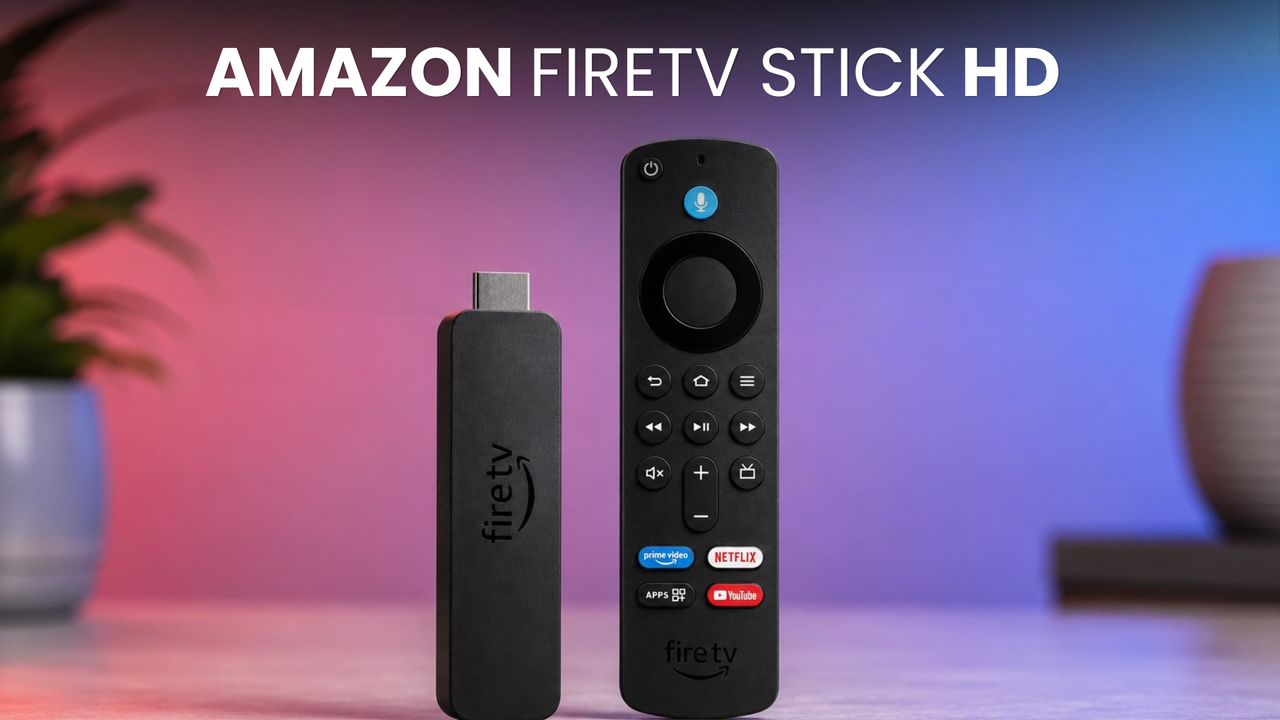
Streaming sticks are a funny product category in India. On paper, they’re the cheapest ticket into the smart TV world, and yet, most households I know are still holding on to a set-top box like it’s a household tradition to use them. The ones who did make the jump mostly landed on some version of Amazon Fire TV Stick, and it’s still one of the best options in the market. But if you bought one for yourself years ago, the question isn’t “should I buy a streaming stick” anymore, it’s “has mine aged out?” That’s exactly where the new Fire TV Stick HD comes in.
I’ve been using the Fire TV Stick HD for a couple of weeks now, plugged into my TV, streaming everything from live cricket to old Bollywood films. It costs Rs 4,999 here in India, and after moving to it from my older 2022 Fire Stick, here’s everything you should know before spending on it.
Amazon Fire TV Stick HD Review: Design and Remote
There’s not a lot to say about how a streaming stick looks, because let’s be honest, it lives behind your TV and you’ll probably never see it again after day one. But there’s one change here that genuinely made me happy – the Type-C port. My previous Fire Stick was still stuck on micro-USB, and moving to Type-C makes this whole setup far more accessible. One less cable in my drawer, and honestly, it was about time.
What you will touch every single day is the remote, and thankfully, that’s where the real improvement is. The buttons feel more tactile now, with a satisfying click that the older remotes lacked. Even the battery casing is shorter, which means I no longer keep accidentally popping open the battery tray — a small thing, but it genuinely used to annoy me on my old Fire Stick.
Now for the part that annoyed me right out of the box. Amazon has quietly removed the little HDMI extender dongle that used to come free with Fire Sticks. If your TV’s HDMI port sits in an awkward, hard-to-reach corner, that tiny dongle was a lifesaver. It cost Amazon next to nothing, it solved a real problem, and it’s just… gone. No clue why.
Amazon Fire TV Stick HD Review: Setup and UI
Setting this thing up is genuinely smooth. I scanned a QR code from my phone, my accounts logged themselves in, and pairing the remote with my TV took all of two button presses. From unboxing to actually watching something, it’s a matter of minutes. If you’ve ever set up a smart TV from scratch with that painful on-screen keyboard, you’ll appreciate how painless this is.
The updated Fire OS UI is fluid, it’s responsive, and scrolling through the home screen actually feels nice now instead of feeling like a chore. And here’s my favourite bit — it’s easy enough for everyone at my home. My mother, who is not a tech person by any stretch, scrolls through the home screen and finds her apps without calling me for help. She’s also become best friends with the Alexa. A simple press can be used to hunt down older Bollywood films, and Alexa gets it right every time. Amazon has done its homework on Indian accents, because proper Hindi and Hinglish queries were never an issue during my usage.
Now, the ads. Yes, the Fire OS home screen has sponsored rows and banners, and there’s no getting around that. In my case, I consume a lot of India-specific Prime Video content anyway, so a banner about a new series was less of an ad and more of a reminder for me. But I completely understand that if you’re not into that content, the home screen can feel a bit cluttered with things you didn’t ask for. Either way, I do think Amazon should seriously consider an ad-free experience.
Amazon Fire TV Stick HD Review: Performance
Coming from a 2022 Fire Stick, and having originally started my Fire Stick journey with the 3rd Gen model back in 2019, I have a decent sense of how this lineup has aged. And the short version is — the experience here is buttery smooth. Animations are clean, apps open and close quickly, and the whole UI feels responsive in a way older Fire Sticks simply didn’t.
I ran JioHotstar, Netflix, YouTube and Zee5 together to see how it handles the apps an average Indian household actually uses. The RAM management impressed me — I could jump back to apps and they’d still be sitting in memory, exactly where I left them. The only troublemaker was Zee5, which stuttered around, but in its defence, that app is poorly optimised on almost every platform it exists on, so I’m not gonna blame it on the stick.
WiFi performance is slightly better too, though I’d call it a range improvement more than a raw speed jump. My actual streaming speeds felt about the same as my 2022 model, just a bit more stable in the far corners of the house.
But here’s the thing that genuinely tested my patience — the updates. In my roughly two weeks with the device, it pulled in 3-4 system updates, each taking a good 10-15 minutes from download to install. There was a day I sat down to watch something while eating and ended up watching a progress bar instead. I’m not kidding, this happened with me just yesterday. And the worst part? After every update, nothing felt new. It almost felt like the stick was reinstalling the same update on loop. Now, don’t get me wrong, I’m always in the favour of more updates, even if it’s fixing the stuff that doesnt appear visually — updates are good, but this frequency, on a device meant for lean-back entertainment, is plain annoying. Planning for some Netflix and chill? Nah, update your stick first.
Another one of my small complaint is with the remote. It still runs on non-rechargeable AA batteries, and being a Bluetooth remote, it eats through them at an alarming rate. I started getting the low-battery warning within my first couple of weeks of usage. It’s 2026 and a built-in rechargeable pack with that shiny new Type-C port would’ve solved this forever. Instead, I’m now that person keeping a stash of AA batteries in the TV drawer. Feeling like gramps already.
Amazon Fire TV Stick HD Review: Verdict
The Amazon Fire TV Stick HD is a product that knows exactly who it’s for, and for that person, it’s genuinely great. The UI is the best it has ever been, the family-friendly experience with India-specific content and Hindi-Hinglish Alexa support is excellent, and at Rs 4,999, it’s an easy pill to swallow. It’s not flawless though — the aggressive update schedule, the external HDMI extender that you’ll have to pay additionally for, and that battery-hungry remote are compromises you’ll be living with.
Who should buy this? If you’re running an old 1080p TV with a set-top box, this is the cheapest, easiest upgrade you can gift your living room. First-time streamers will love how simple it is, and if there are elderly members at home, the easy UI and Alexa voice search make this an honest recommendation. Also, if your Fire Stick is from 2020 or earlier, the hardware jump alone makes this upgrade worth it — everything simply feels quicker.
Who should skip this? If you own a 4K TV, don’t even think about this one — spend a little more and get the Fire TV Stick 4K instead, because this stick maxes out at 1080p. And if you’re sitting on a 2022 or newer Fire Stick like I was, stay put. Slightly better Wi-Fi range alone is not a Rs 4,999 upgrade, no matter how you do the math.
For Rs 4,999, the Fire TV Stick HD won’t wow anyone on a spec sheet, but it nails the basics for the household it’s built for. It’s a device your whole family can use without calling you for help — and sometimes, that’s the biggest feature of all.
