
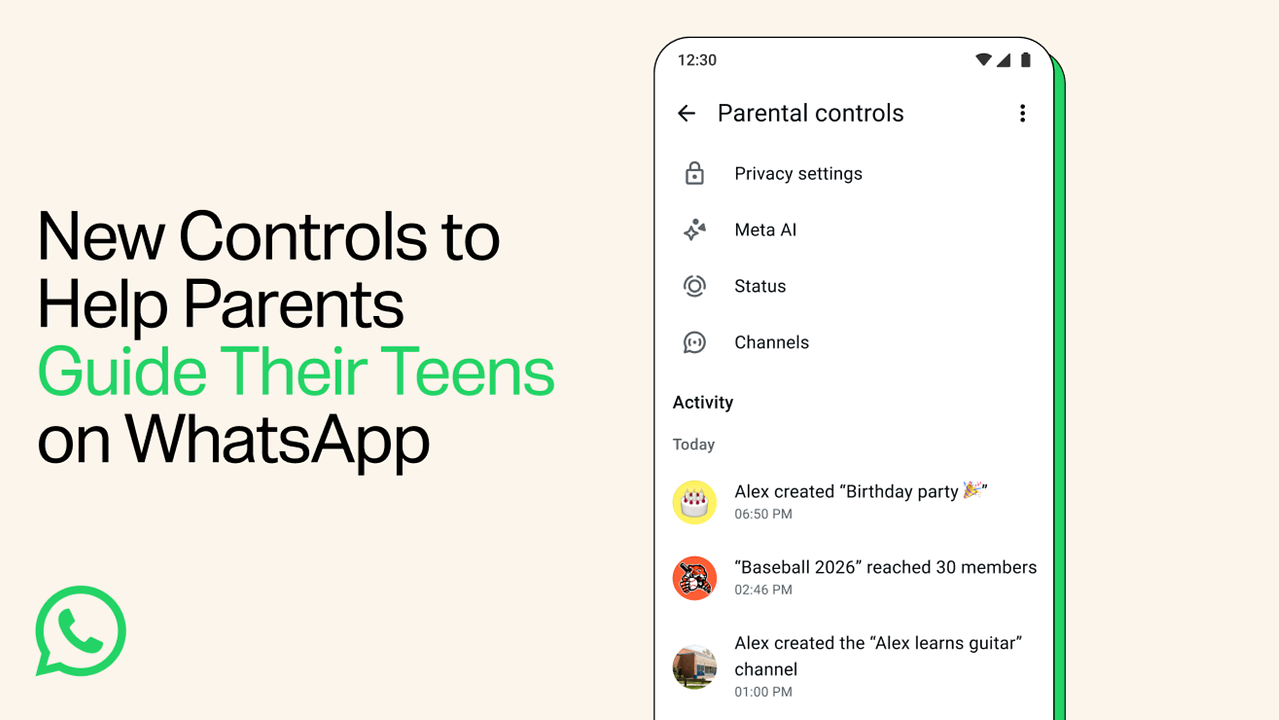
Meta-owned WhatsApp is giving parents more control over how their teenagers use the messaging app. The instant messaging app has introduced new parental controls in India that allow parents to manage privacy settings, keep track of certain group activity and decide how their teens use features such as Channels, Status and Meta AI.
“Today we’re introducing parental controls for teens – a set of flexible, optional tools that parents and teens can set up together to help families choose the WhatsApp experience that’s right for them,” the popular instant messaging app said in a statement.
The new controls are optional and are offered to help parents guide their teens without reading their private chats.
With the new feature, parents can help decide which privacy settings are suitable for their teen. This includes controls over who can see the teen’s profile photo and who can add them to groups.
If a teen wants to change some of these settings to allow more people to interact with them, approval from the parent may be required through a parent-set PIN.
According to Meta-owned app, Parents can also stay updated about their teen’s group activity. WhatsApp will allow them to receive notifications when their teen joins or leaves a group. They can also get an alert when a group their teen is part of grows significantly in size.
This gives parents a better idea of the communities their teen is joining without allowing them to read the conversations.
The new controls also extend to WhatsApp’s Channels and Status features. Parents can decide how their teen uses Channels, which Status updates they can view and who can see their teen’s Status updates.
Meta AI is also covered under the new controls. Parents can choose the default 13+ experience for their teen or select a stricter ‘Limited Content’ option, depending on what they feel is suitable for their family.
How To Set Up WhatsApp Parental Controls For Teens
Parents and teens can set up the new controls together on WhatsApp. When setting up parental controls, parents need to create a unique 6-digit PIN.
This PIN is required to access and manage the parental controls.
To change the PIN later:
– Open WhatsApp and go to Settings.
– Tap Parental controls and select your child’s account.
– Tap three dots > Change parent PIN.
– Enter a new 6-digit PIN and tap Next.
– Confirm the PIN and tap Done.
WhatsApp says the PIN can be changed anytime and an activity alert is shown when the PIN is changed.
